
Spyware detection is like playing a game of hide and seek with a very sneaky ghost lurking in your computer. Whether you’re a digital detective or just someone trying to Netflix and chill without an unwelcome eavesdropper, understanding how to spot and stop spyware is essential. This digital menace can siphon off your secrets faster than you can say “data breach,” so let’s dive into the world of spyware detection and learn to kick those unwanted guests to the curb!
From antivirus watchdogs barking at suspicious behavior to clever software sleuths scanning for hidden intruders, this discussion will arm you with knowledge about the various techniques and tools that help keep your devices safe. Furthermore, we’ll explore the chilling effects spyware can have on your system’s performance and privacy, ensuring you’re fully clued in on the importance of preventing such digital trespassing.
Spyware Detection Techniques
Detecting spyware is akin to playing hide and seek with a particularly sneaky opponent. While they’re busy trying to blend in, we need to summon our inner digital sleuths to sniff them out. Various techniques exist that allow individuals to uncover these lurking intruders, ensuring that our personal devices remain fortress-like against unwelcome guests.One of the primary methods of detecting spyware involves monitoring system performance and activity.
A sudden slowdown of your device, frequent crashes, or unexplained pop-ups can be telltale signs of spyware at work. Another effective approach is examining network traffic. Spyware often communicates with remote servers, and unusual data transmissions to unknown IP addresses can serve as red flags. Additionally, manual inspection of installed applications and processes can help identify any suspicious software masquerading as legitimate programs.
Antivirus Software Role in Spyware Detection
Antivirus software plays a critical role in the fight against spyware, acting as your digital bodyguard. These programs employ various detection techniques, such as signature-based detection, which identifies known spyware through its unique code. They also utilize heuristic-based detection to discover new, unknown spyware by analyzing behaviors and attributes that deviate from the norm. Incorporating real-time scanning capabilities, antivirus software ensures that potential threats are detected and neutralized before they can wreak havoc.
Regular updates are essential, as new spyware variants are developed almost daily. Therefore, having a well-maintained antivirus solution is like keeping your locks and alarms in top shape, providing peace of mind in the chaotic realm of the internet.
Tools and Software for Spyware Detection
A variety of tools and software are available, each with its unique approach to detecting spyware. Understanding these options can empower users to choose the right solutions for their protection. The following tools can be crucial in identifying and eliminating spyware:
- Malwarebytes: Renowned for its robust detection capabilities, this tool scans for and removes spyware and other malware, making it a favorite among users.
- Spybot – Search & Destroy: A classic in the spyware detection arena, it specializes in detecting and removing spyware and adware.
- SuperAntiSpyware: This tool provides comprehensive scanning and removal features, helping to rid your device of obnoxious spyware.
- Windows Defender: Built into Windows, this antivirus solution includes spyware detection features, offering a solid first line of defense.
- AdwCleaner: Perfect for cleaning up adware and potentially unwanted programs that may be bundled with spyware.
These tools form the backbone of a well-rounded spyware detection strategy, combining proactive monitoring and robust scanning capabilities to fend off digital intruders.
“An ounce of prevention is worth a pound of cure”
especially true in the digital realm, where the wrong click can open the door to spyware.
Impact of Spyware on Computer Systems
Spyware might sound like a character from a spy movie, but in reality, it’s more like that sneaky cousin who rummages through your drawers when you’re not around. It creeps into your computer without an invitation and wreaks havoc, both on system performance and your privacy. Let’s dive into the digital chaos it inflicts upon unsuspecting systems!
Effects on System Performance and Privacy
Spyware can be as disruptive as a toddler at bedtime. Once it infiltrates a computer, it can lead to a number of distressing effects, including sluggish performance, constant crashes, and even inexplicable pop-up ads that invade your screen like an unwanted houseguest. Here are some of the primary impacts:
- Slow System Performance: Spyware consumes system resources, making your trusty computer feel like it’s stuck in quicksand. This can result in slower boot times and lag during simple tasks.
- Increased Bandwidth Usage: Just like that friend who eats all your snacks, spyware can hog your internet bandwidth, leading to slower browsing speeds and buffering videos that test your patience.
- Privacy Violations: Spyware’s main goal is to keep an eye on you. It can track your online activity, steal personal data, and even access sensitive information, turning your personal life into an open book for cybercriminals.
To paint a clearer picture, imagine logging into your bank account only to find that your balance has mysteriously shrunk. That’s spyware in action, making you feel like you’re in an episode of a crime show—not cool!
Differences Between Spyware and Other Forms of Malware
While all malware is bad news, spyware has its own unique flavor of malevolence. Understanding the differences can help you appreciate the insidious nature of spyware compared to its less sneaky cousins. Here’s a breakdown:
- Spyware: Primarily focused on stealthily collecting your data and monitoring your activities without consent.
- Viruses: These are more aggressive, aiming to replicate themselves and spread to other devices, causing widespread chaos.
- Trojan Horses: Unlike spyware, Trojans disguise themselves as legitimate software, tricking you into installing them.
- Adware: While also intrusive, adware primarily bombards you with unwanted advertisements rather than covertly collecting sensitive information.
Understanding these distinctions is crucial, as it can help users identify threats more accurately and protect themselves against the digital villains lurking in the shadows.
Legal Implications of Spyware Installation Without Consent
When it comes to legal matters, spyware installation without consent is like throwing a surprise party that no one wanted. It’s a big no-no! Various laws have been established to address the unauthorized use of spyware, recognizing the serious invasion of privacy it represents. Here are the key legal ramifications:
- Computer Fraud and Abuse Act (CFAA): This U.S. law makes it illegal to access a computer without authorization, which includes deploying spyware.
- Electronic Communications Privacy Act (ECPA): This federal law protects the privacy of electronic communications, penalizing those who intercept or access communications without permission.
- State Laws: Many states have their own laws against spyware, often including hefty fines for offenders. This can include civil lawsuits from affected individuals.
In the courtroom, cases related to spyware have surfaced, reminding us that the digital world is governed by rules just like the real one. So, if you think you can just slip spyware under the radar, think again! The law has its magnifying glass ready to catch you in the act.
Best Practices for Preventing Spyware
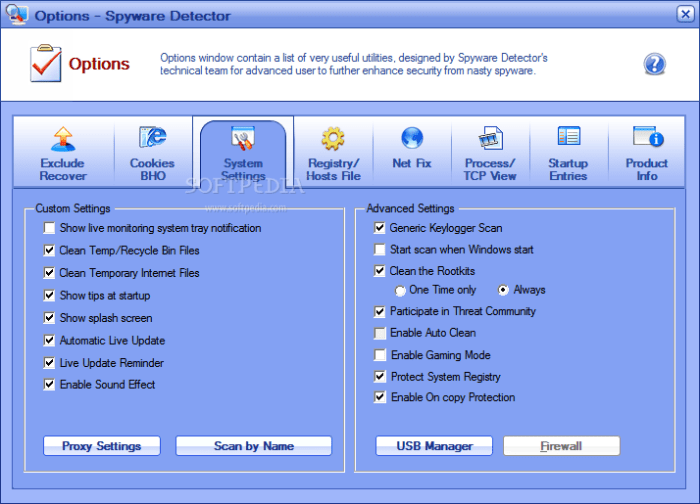
In the digital jungle we navigate daily, spyware lurks like a mischievous monkey, ready to swing down and snatch your precious data. To keep these unwelcome guests at bay, it’s essential to arm yourself with some best practices. They say an ounce of prevention is worth a pound of cure, and in the realm of cybersecurity, this couldn’t be more accurate.
Let’s dive into the delightful world of defense strategies to keep your devices spyware-free!
Guidelines for Avoiding Spyware Infections
Adopting a few simple yet effective guidelines can make your digital life as safe as a cozy blanket fort. Following these practices can help ensure that spyware doesn’t crash your electronic party.
- Always download software from official websites or trusted sources. Avoid that sketchy site that looks like it was designed in 1998; it’s probably hiding something nasty.
- Utilize robust antivirus programs with real-time protection. Think of it as your personal bodyguard against the digital riffraff.
- Be cautious with email attachments and links. If it looks like spam, smells like spam, and has a subject line that seems to scream “Click me!”, it’s probably spam.
- Limit your permissions. Just like you wouldn’t let a stranger into your house without a good reason, don’t give apps access to your personal data unless absolutely necessary.
The Importance of Regular Software Updates
An outdated system is like a rusty lock on the door of your home; it invites trouble. Keeping your software and operating systems up to date is critical in the fight against spyware. Developers constantly release updates that patch vulnerabilities, and skipping these updates is like leaving a welcome mat out for cybercriminals.
- Automatic updates can be your best friend. Enable them and let the software do the heavy lifting while you sit back and enjoy your coffee.
- Regularly check for updates on all applications, especially your web browsers. They are the gateways to the internet, and you wouldn’t want them to be unguarded!
- Stay informed about the latest security vulnerabilities. Sometimes, it feels like a game of whack-a-mole, but knowledge is your best weapon.
Safe Browsing Habits to Minimize Risk
The web can be a treacherous place, but with the right browsing habits, you can surf the net like a pro without wiping out on a spyware wave.
- Use strong, unique passwords for each online account. Consider a password manager as your digital vault, keeping your passwords safe and sound.
- Stick with reputable browsers that offer security features. Chrome, Firefox, and Edge are like the trusty sidekicks you want on your adventure.
- Be mindful of public Wi-Fi networks. Using a VPN can help secure your connection, acting like a secret cloak that keeps your data hidden from prying eyes.
- Adopt the principle of least privilege. Only provide necessary information to websites. Your life story isn’t needed for a pizza delivery!
“An ounce of prevention is worth a pound of cure.”
Benjamin Franklin, probably talking about spyware.
Conclusive Thoughts
In the grand showdown between you and spyware, knowledge is your most formidable weapon. By embracing best practices and keeping your digital defenses sharp, you can ensure that your devices remain a safe haven rather than a playground for snoopers. So, equip yourself with the right tools, stay educated, and remember: in the battle of bytes, you don’t have to be a tech wizard to outsmart the sneaky spyware lurking about!
Helpful Answers
What is spyware?
Spyware is malicious software designed to gather personal information from a computer, often without the user’s knowledge.
How can I tell if I have spyware?
Signs of spyware include slow system performance, unexpected pop-ups, and unfamiliar programs running in the background.
Can spyware be removed?
Yes, spyware can be removed using specialized anti-spyware tools or comprehensive antivirus software.
Are there free tools for spyware detection?
Yes, there are several free tools available, such as Malwarebytes and Spybot Search & Destroy, that can detect and remove spyware.
Is spyware legal?
Installing spyware without consent is illegal in many jurisdictions, as it violates privacy laws and regulations.


