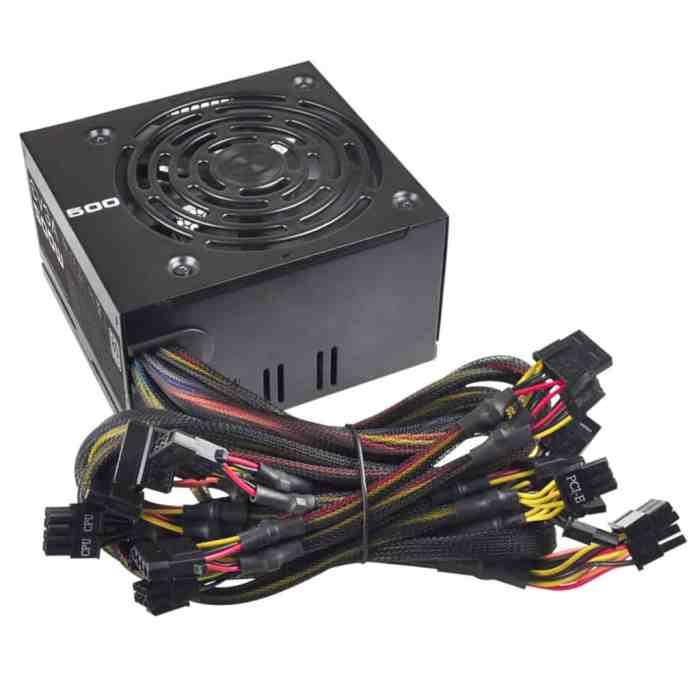
Ever wonder what keeps your computer from becoming a fancy paperweight? Enter the computer power supply, the unsung hero of the tech world, quietly buzzing away like a caffeinated bee, ensuring your circuits are as happy as a clam at high tide.
This vital component transforms wall-sourced electricity into the precise voltages your computer craves, powering everything from your gaming rig to your grandma’s ancient desktop. With various types like ATX and SFX, it’s like the buffet of power supplies, each serving up wattages and features to match any computing appetite!
Understanding Computer Power Supply
A computer power supply is like the heart of your PC, pumping the vital juice that keeps everything running smoothly. It converts the alternating current (AC) from your wall socket into direct current (DC) that your computer components can actually use. Without a power supply, your computer would be as useful as a chocolate teapot—completely useless!The power supply is not just a one-size-fits-all component; it comes in different shapes and sizes, each tailored for specific needs.
The most common types include ATX, SFX, and more. An ATX power supply is your go-to for standard desktop builds, while an SFX power supply is ideal for compact builds where space is at a premium but power is still a must.
Types of Power Supplies and Their Applications
Understanding the types of power supplies available can help you make an informed choice when building or upgrading your computer. Here’s a breakdown of some common types and their applications:
- ATX Power Supply: The most widely used type for desktops, suitable for mid to high-end systems.
- SFX Power Supply: Perfect for small form factor cases; it packs a punch despite its compact size.
- TFX Power Supply: Often found in slim desktops and specialized builds, it’s designed to save space while providing adequate power.
- Flex ATX Power Supply: Similar to TFX but even more compact; great for niche applications or extremely tight spaces.
Power Supply Wattages and Their Uses
Power supply wattages determine how much power your components can utilize. It’s crucial to select the right wattage for your build to avoid potential issues like insufficient power or wasted energy. Below is a comparison table highlighting various wattages and their corresponding uses in computing setups:
| Wattage | Typical Use |
|---|---|
| 300W | Basic office or home computers |
| 500W | Mid-range gaming PCs and general workloads |
| 750W | High-end gaming rigs with multiple GPUs |
| 1000W+ | Workstations and enthusiast builds with extensive hardware |
“Choosing the right power supply is crucial; too little power can lead to poor performance, while too much can be a waste of energy—and money!”
Components and Specifications of Power Supplies
A computer power supply unit (PSU) is like the unsung hero of your computer—a slight, unassuming box that transforms wall electricity into a magical stream of power that keeps your components humming. Without it, your computer would be as useful as a toaster without bread! Let’s dive into the nitty-gritty of what makes up this electronic powerhouse and how to choose one that suits your needs, without letting the smoke escape.The inner workings of a power supply can be as complex as assembling IKEA furniture without instructions.
There are several key components, each with a distinct role, collaborating to ensure your computer runs smoothly and efficiently. Understanding these parts can save you from falling into the abyss of bad power supply purchases.
Key Components of a Power Supply
The PSU is made up of several crucial components, each performing its own magic trick:
- Transformer: This is the big guy that adjusts voltage levels—like a bouncer at the club, making sure only the right amount of electricity gets through.
- Rectifier: Think of this component as the translator—it converts AC (Alternating Current) from the wall to DC (Direct Current) that your computer can understand.
- Capacitors: These are the energy storage units, like tiny batteries that help smooth out the electrical output, preventing fluctuations that could send your components into a tizzy.
- Cooling Fan: This little whirlwind ensures your PSU doesn’t overheat, which is crucial because a hot PSU is like a hothead—unpredictable and prone to drama.
- PCB (Printed Circuit Board): The silent architect that holds everything together, the PCB connects all the components and helps direct the flow of electricity.
Specifications to Consider When Selecting a Power Supply
When shopping for a power supply, it’s essential to keep an eye on its specifications. Just like you wouldn’t buy a car without checking its horsepower, you shouldn’t settle for a PSU without understanding its specs.Here are the key specifications to consider:
- Wattage: This is the maximum power the PSU can deliver. Make sure it has enough wattage to support all your components, because nobody likes a power struggle.
- Efficiency Rating: Look for an 80 PLUS certification. The higher the rating, the more efficient your power supply is, saving you both energy and money—like finding a penny in the couch cushions!
- Modularity: Power supplies come in three flavors: non-modular, semi-modular, and fully modular. Fully modular PSUs let you connect only the cables you need, leading to a cleaner build—think of it as decluttering your digital workspace.
- Rail Stability: This relates to how well the power supply can handle various loads. A good PSU should provide stable voltages under varying loads—like a tightrope walker who doesn’t wobble!
- Protection Features: Look for features like over-voltage, under-voltage, and short circuit protection. These safety nets will protect your components and keep your PSU from turning into a dramatic diva!
Internal Structure of a Power Supply Unit
Visualizing the internal structure of a PSU can help demystify its workings. Picture a compact engineering marvel, where every component has its designated space and function. Imagine the transformer sitting proudly, with the rectifier by its side, and capacitors like loyal sidekicks ready to smooth out any bumps.The PSU’s internal diagram features:
The Input Stage
Where the magic begins with the incoming AC power.
The Output Stage
Where beautifully regulated DC outputs are served hot and ready for your system.
The Cooling System
The fan and vents work tirelessly to keep things chill, preventing any heat-related tantrums.In this internal wonderland, you’ll find traces of copper routing power between components like highways connecting bustling cities. Each circuit is a well-planned route ensuring that your components are fed the power they crave without any unnecessary detours.
Power Supply Troubleshooting and Maintenance
When it comes to keeping your computer’s power supply running smoothly, it’s essential to stay ahead of potential issues before they zap your system into a digital coma. Power supplies are the unsung heroes of your computer, tirelessly converting AC to DC and distributing power like a grandparent handing out cookies. However, just like those cookies, power supplies can sometimes crumble.
Here’s how to keep your power supply in tip-top shape, troubleshoot common woes, and ensure it lives a long and happy life.
Common Issues and Diagnosis
Power supplies may not be the flashiest component of your computer, but they can definitely be the source of the most frustrating problems. Below are some common issues that can arise, along with diagnostic tips that will make you feel like a power supply whisperer.
- Power Failure: If your computer won’t start at all, it could be due to a power supply failure. Check if the power cable is securely connected and if the outlet is functional.
- Random Shutdowns: When your PC unexpectedly shuts down, it might be overloading. This could mean your power supply is struggling to keep up with the demands of your hardware.
- Overheating: Excessive heat can cause a power supply to fail. Ensure that the ventilation is clear and fans are operational. Think of it like giving your power supply a refreshing breeze on a hot summer day.
- Noisy Operation: A power supply that sounds like a helicopter might have a fan issue or may be struggling under load. Listen to the sounds; they’re the power supply’s way of complaining!
Testing a Power Supply with a Multimeter
Testing your power supply can sound like a job for an electrician but fear not! With a multimeter and a bit of courage, you can perform a safe and systematic test of your power supply. Follow these steps to ensure your power supply is still buzzing with energy.
- Safety First: Turn off your computer and unplug it. Let’s not turn this into an electrifying experience. Ground yourself to prevent static discharge.
- Access the Power Supply: Open your computer case and locate the power supply unit (PSU). It’s usually a rectangular box with a fan, hidden away like a shy turtle.
- Connect the Multimeter: Set your multimeter to measure DC voltage. Insert the black probe into the COM port and the red probe into the VΩmA port.
- Power the PSU: Use a paperclip to short the green wire (PS_ON) and any black wire (COM) on the 24-pin connector to power up the PSU without a motherboard.
- Measure Voltage: Touch the multimeter probes to the respective pins on the 24-pin connector. You should get stable readings: +12V, +5V, and +3.3V. If not, you might need a new power supply—time to say goodbye!
Preventative Measures for Power Supply Longevity
A little care can go a long way in extending the lifespan of your power supply. Like a well-fed houseplant, your PSU thrives when conditions are just right. Here are some preventative measures to keep it running like a dream.
- Keep It Clean: Dust is the enemy. Regularly clean the inside of your computer case to prevent dust buildup in the power supply. Use compressed air to blow away the dust bunnies.
- Ensure Adequate Cooling: Proper airflow is critical. Consider adding extra fans or rearranging cables to ensure air can flow freely around your power supply.
- Avoid Overloading: Don’t attach too many high-powered components to your PSU. Always check the wattage limit and do some math to ensure you’re not asking your PSU to lift a weight it can’t handle.
- Regular Inspections: Schedule yearly check-ups. Just like your dentist, your power supply deserves a little attention. Check cables for wear and connectors for corrosion.
Last Word
In conclusion, the computer power supply is more than just a box of wires and magic. It’s the lifeblood of your system, guarding against power surges like a knight in shining armor while ensuring your digital kingdom runs smoothly. So, next time you power up, give a little nod of appreciation to the silent sentinel fueling your digital escapades!
Quick FAQs
How do I know if my power supply is failing?
Look for signs like random shutdowns, failure to power on, or strange noises—if your power supply is auditioning for a horror movie, it might be time for a replacement!
What is modularity in power supplies?
Modularity refers to whether you can connect only the cables you need—think of it as a power supply that respects your minimalist lifestyle!
Do I need a powerful power supply for gaming?
Yes, gaming PCs typically require more power to handle high-performance components, just like superheroes need their capes!
Can I use a power supply from an old PC?
Not always! Make sure the wattage and connections are compatible; otherwise, your old power supply could be more of a liability than an asset.
How often should I replace my power supply?
A good rule of thumb is every 5-7 years, or whenever you hear it whispering sweet nothings to the afterlife!


